Let’s explore some basic data analysis using pandas.
import pandas as pd
import numpy as np

# Create a sample dataset
np.random.seed(42)
data = {
    'date': pd.date_range('2026-01-01', periods=30, freq='D'),
    'sales': np.random.randint(100, 500, 30),
    'customers': np.random.randint(20, 100, 30)
}
df = pd.DataFrame(data)

# Display basic statistics
print("Dataset Summary:")
print(df.describe())

# Show first few rows
df.head()
Dataset Summary:
date sales customers
count 30 30.000000 30.000000
mean 2026-01-15 12:00:00 308.433333 60.500000
min 2026-01-01 00:00:00 120.000000 21.000000
25% 2026-01-08 06:00:00 209.750000 34.750000
50% 2026-01-15 12:00:00 302.500000 69.000000
75% 2026-01-22 18:00:00 404.250000 79.000000
max 2026-01-30 00:00:00 485.000000 99.000000
std NaN 109.450881 24.415583| date | sales | customers | |
|---|---|---|---|
| 0 | 2026-01-01 | 202 | 68 |
| 1 | 2026-01-02 | 448 | 78 |
| 2 | 2026-01-03 | 370 | 61 |
| 3 | 2026-01-04 | 206 | 79 |
| 4 | 2026-01-05 | 171 | 99 |
# Calculate rolling average
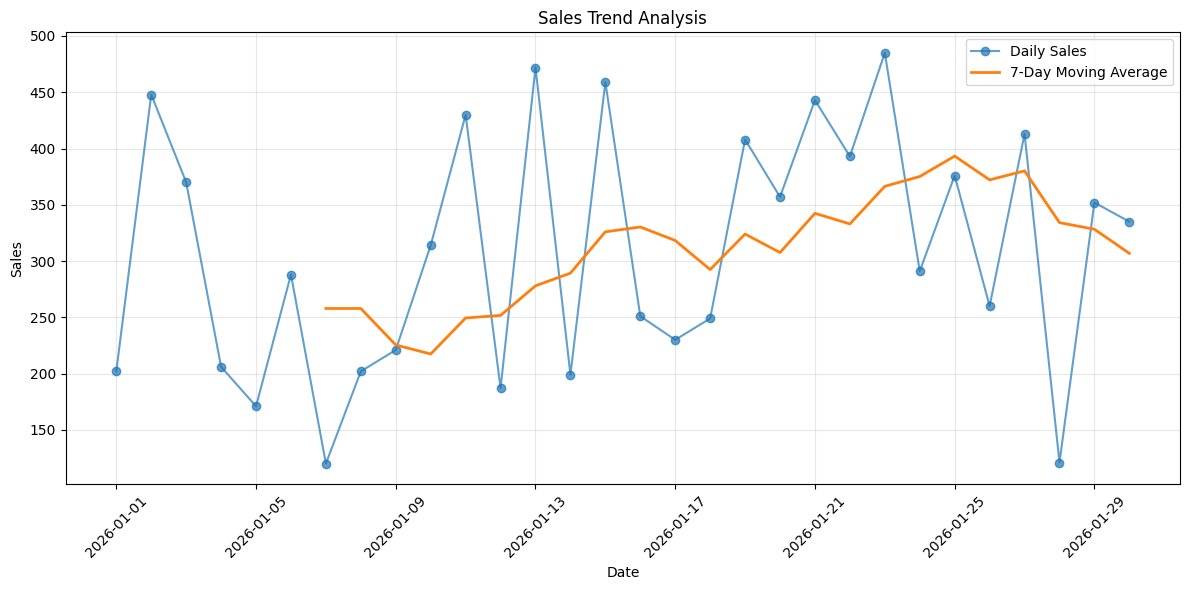
df['sales_rolling_avg'] = df['sales'].rolling(window=7).mean()

# Plot the data
import matplotlib.pyplot as plt

plt.figure(figsize=(12, 6))
plt.plot(df['date'], df['sales'], label='Daily Sales', alpha=0.7, marker='o')
plt.plot(df['date'], df['sales_rolling_avg'], label='7-Day Moving Average', linewidth=2)
plt.xlabel('Date')
plt.ylabel('Sales')
plt.title('Sales Trend Analysis')
plt.legend()
plt.grid(True, alpha=0.3)
plt.xticks(rotation=45)
plt.tight_layout()
plt.show()